
Download FISCO - Investment Information App – Investment Information App, Stock Recommendations, Finance Tool, Business & Productivity
Overview
FISCO - Investment Information App is a free Android application designed to support investors in accessing timely and curated financial data. Developed by FISCO, the app operates within the Business & Productivity category, specifically targeting the Finance subcategory. Its primary purpose is to simplify the process of investment research by delivering daily stock recommendations, market insights, and comprehensive company information. The app aims to help users make informed decisions by providing analyst-curated selections, accompanied by detailed explanations for each recommendation. This functionality is particularly beneficial for individual investors and financial enthusiasts seeking efficient tools to stay updated on market trends.
Real-world usage scenarios include monitoring daily stock picks, tracking upcoming corporate announcements, and exploring thematic investment opportunities. The app also supports users in conducting in-depth analysis through its screening function, enabling them to filter stocks based on specific criteria. FISCO has been featured in prominent media outlets such as TV Tokyo’s “World Business Satellite” and Nikkei CNBC’s “Emerging Market NOW,” indicating its recognition within the financial information space. While the developer did not provide additional system requirements, the app is available for free on the Google Play Store, making it accessible to a broad audience. The release date was December 7, 2023.
Key Features & Capabilities
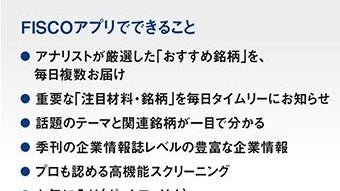
- Daily Stock Recommendations: The app delivers curated stock picks selected by financial analysts, each accompanied by a rationale to help users understand the underlying investment logic.
- Analyst Commentary: Users receive insights and explanations from professionals, enhancing transparency and aiding in decision-making.
- Event Schedule: A built-in calendar displays important corporate announcements, helping users prepare for market-moving events.
- Theme-Based Brand Information: The app organizes stocks by market themes, allowing users to explore investment trends tied to specific industries or global topics.
- High-Performance Screening Function: Enables filtering of stocks based on multiple conditions, supporting advanced users in narrowing down options efficiently.
- Comprehensive Company and Stock Data: Centralized access to detailed information reduces the need to navigate multiple platforms, saving time during research.
These features collectively support users in conducting efficient investment analysis, whether for short-term trading or long-term portfolio management. The app’s structure allows for both novice and experienced investors to benefit, depending on their level of engagement with the tools provided.
User Interface, Workflow & Performance
The FISCO app presents a clean and intuitive interface tailored for mobile use. Navigation is structured around core sections such as recommendations, events, themes, and screening tools, allowing users to access key features with minimal effort. The workflow is designed to streamline the investment research process, guiding users from discovery to analysis in a logical sequence.
While the developer did not specify resource usage details, the app is built for Android devices and operates within standard mobile performance parameters. Performance observations are based on general software behavior patterns. Stability appears consistent, as the app is available on the Google Play Store with no reported widespread issues. The user experience is optimized for touch-based interaction, with responsive elements and smooth transitions between screens.
For users relying on the app for real-time updates, the interface supports quick access to critical information without requiring extensive navigation. The layout prioritizes readability and data clarity, which is essential when processing financial content under time-sensitive conditions. The app’s design reflects a focus on usability, ensuring that users can extract value quickly and efficiently.
Compatibility & System Requirements
FISCO - Investment Information App is designed for Android devices and is available for free on the Google Play Store. The developer did not specify exact system requirements, including minimum OS version, RAM, or storage needs. Compatibility information is limited to the Android platform, and no details were provided regarding support for tablets or other form factors.
Installation size is not specified, but the app is categorized as a standard mobile application. The developer did not provide information on hardware requirements or background processes. Users should ensure their device meets general Android compatibility standards for app installation and operation. The release date was December 7, 2023, indicating a relatively recent launch with ongoing relevance in the current financial information landscape.
Pros and Cons
Pros
- Free to download and use, increasing accessibility for individual investors.
- Curated stock recommendations with analyst explanations enhance decision-making.
- Comprehensive event calendar supports proactive investment planning.
- Thematic investment tracking helps users identify emerging market trends.
- High-performance screening function enables advanced filtering for stock analysis.
- Centralized access to company and stock data reduces research time.
Cons
- System requirements were not disclosed, limiting user ability to assess device compatibility.
- Performance and resource usage details were not provided.
- Available only on Android, with no information on iOS or desktop versions.
- Limited data on app stability or offline functionality.
- No information on update frequency or long-term support.
FAQ Section
Is FISCO available for iOS devices?
The app is currently available only on Android. The developer did not provide information about iOS compatibility or future plans.
Is the app secure to use?
FISCO is available on the official Google Play Store, which applies security checks to apps. However, specific security protocols or data handling practices were not disclosed by the developer.
How often are stock recommendations updated?
The app provides daily stock recommendations, aligning with the goal of delivering timely investment insights.
Can I use FISCO offline?
Information about offline functionality was not specified. Users are advised to check the app’s settings or documentation for access to cached data.
Is there a license or subscription required?
FISCO is offered as a free app with no mention of subscription fees or premium features in the provided details.
Final Thoughts + CTA
FISCO - Investment Information App stands out as a practical tool for investors seeking structured, analyst-driven financial insights. Its combination of daily stock picks, thematic tracking, and powerful screening features makes it a valuable resource for both new and experienced users. While the lack of detailed system requirements and performance data limits deeper technical evaluation, the app’s clean interface and focus on usability are clear strengths.
Given its free availability and media recognition, FISCO offers a compelling entry point into informed investing. Users who prioritize timely, curated market data and efficient research workflows will benefit most. The app’s mobile-first design ensures accessibility, though the absence of cross-platform support may be a consideration for some.
Download FISCO now to access curated investment insights and streamline your financial research.





.png)

